Feb 8th, 2010 by papabear
I hate complicated things and naturally, I would look for shortcuts while fully aware that most shortcuts do not work… Tau tak pe…
This time, I took the shortcut in redirecting my sub domain under http://bbd.kisahberuang.com to http://kisahberuang.com.
The shortcut that I am referring to is using the redirect function in my cPanel.
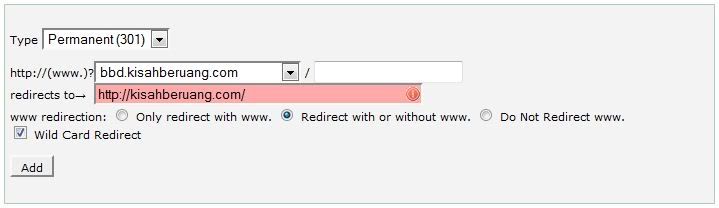
So, after importing all entries and comments, I selected Redirect with or without www and then selected the Wild Card Redirect as well. It was supposed to make your old links go to your new links when people click on them. So it said…
Done. Tested. The main URL has no issue and it got directed to the new domain. But, the old links, such as from search engine results, gave a page not found instead… Hampeh betui…
I saw Sam of serverfreak online and asked him about my problem. He gave me a solution. That’s why I changed from my previous hosting to serverfreak. It has the best customer services so far. Promote dia sebab dah tolong for free… If you need a reliable hosting, give serverfreak a try. Go to http://www.web-hosting.net.my/.
The solution. Changed the .htaccess file in the subdomain. Changed the original,
RewriteCond %{HTTP_HOST} ^bbd.kisahberuang.com$ [OR]RewriteCond %{HTTP_HOST} ^www.bbd.kisahberuang.com$
RewriteRule ^(.*)$ “http\:\/\/kisahberuang\.com$1″ [R=301,L]
To
RewriteEngine onRewriteCond %{HTTP_HOST} ^(www\.)?bbd.kisahberuang\.com [OR]
RewriteCond %{HTTP_HOST} ^kisahberuang\.com
RewriteRule (.*) http://www.kisahberuang.com/$1 [R=301,L]
Now, I managed to get any URL referring to the old domain to go to the new domain. Yes! Aku berjaya…
p/s;
Still could not figure out how to get old links/entries to go to the old links/entries in the new domain. Camna ek?


2 comments:
woi, apa ni woi...xpaham!!!
that's good... hahahah
Post a Comment