March 9, 2010..
cmn pengen nandain hari bersejarah dalam hidup g..
hari ini untuk pertama kalinya g sanggup ninggalin pasha sendirian dikelas musiknya..
minta ijin ke pasha klo g pengen ke belakang bentar.. and during 45mnt session dikelas itu tanpa g.. gak g sangka ternyata pasha sanggup stay didalem kelas and mau denger instruction dari guru musiknya.. beda banget ama pas g atau utinya tungguin.. subhanallah... kamu sudah besar anakku... sudah selangkah lebih mandiri.. sayang kelas di gymboree sudah harus berakhir minggu depan.. this sunday is going tobe his last day at gymboree programme.. *uhuks.. mama yg lagi sedih..
Wednesday, March 10, 2010


One for Touch’ n Go
Mar 8th, 2010 by papabear

I noticed that one transaction was missing from my Touch n’ Go eStatement and it was one of the biggest transaction for the month. It was a RM21.00 transaction for a trip from Jabor to Karak… That might affect the 20% rebate amount for the month of February… Banyak tuh!
As usual, I called up the online customer services to give them the benefit of the doubt that this time it would not be another bad experience. I spoke to a person called Ms Tagala… It didn’t take long for me to anticipate another row with the phone service people… duh…
I told her that I needed an assurance that the amount would be reflected accordingly for my rebate and she refused to give me a straight answer by saying that it was a common thing that always happened to their system… What a system that they have… Finally, I agreed to have a fax the missing details to me for my reference if needed. And that’s when the nightmare started…
When I checked the fax machine the next day, there was a cover page saying a total of six pages but the rest of the pages were not there.
So, I called up again and this time a guy called Mr Fibroid answered and he promised to fax me a fresh copy. Again, I checked the fax machine. It was neither a fresh fax copy, since Ms Tagala’s name was on the fax cover and again, only the cover page was there.
I had to give them a call for the third time and Mr Fibroid was there again and asked me to wait at the fax machine. I waited… and waited… and waited… This time, not even the cover page appeared! Bodoh betul!
I then made the fourth call and another lady picked up asking for my card number again… I told her, “You guys are really ridiculous” and I put down the phone.
Then I made the fifth call and this time Ms Tagala picked up and I told her about her fax problem. She did not even apologize and told me that she would fax another copy… Memang la bengong minah ni…. I told her she can fax it to herself since I want my copy emailed to me. She just said ok… It was like talking to a zombie… without the usual zombie gnarling sounds or whatever sounds that zombies make….
A few days later, I got the statement mailed to me but it was the statement for the whole month of January 2010. All I asked for was for a specific day in February 2010. The email did not come with any greetings and signature. There was only, “Upon your request, we herewith enclosed missing transaction for your reference”. That confirmed Ms Tagala was really a zombie. One rude zombie. I wonder how much do they pay zombies compared to normal humans?
So, out of sheer dissatisfaction, I wrote them an email:
Hi there,
I think there is something wrong with your call center staffs, particularly Tagala? I have told her many times that the missing record that I needed is for 26 February 2010! Why are you sending me transactions for January 2010?
Please get you act together and send me the correct transaction records.
Papa Bear
And finally, after sending the email, Touch n’ Go decided that they should get a human to attend to me. I received a call from Ms Aliza and followed by an email and the statement that I needed:
Dear Papa Bear,
Thank you for your email.
First of all, we regret that our service is not up to expectation during your call to our Careline Centre on 04 March 2010. We will ensure that all our staff are continuously trained to assist customers effectively.
We enclose missing transaction no. 62098 and transactions from 25 – 27 February 2010 for your reference.
If you have any further enquiries, please do not hesitate to contact our Touch ‘n Go Careline Centre at 03-7628 5115 (7.30am to 7.30pm : Monday to Sunday), email to careline@touchngo.com.my or logon to our website, at www.touchngo.com.my for more information. We will be glad to assist you.
Yours faithfully,
Aliza
Touch ‘n Go Careline
There you go. Why couldn’t they get it right the first time? Buang masa betui!
Anyway, thanks to Ms Aliza for resolving the matters promptly and watch out for Ms Tagala the zombie of Touch n’ Go!
Wednesday, March 3, 2010
Another one with Maxis
Mar 2nd, 2010 by papabear

I had another tiff with Maxis a few days ago. This time was about trying to clarify some amounts stated in the monthly statement. I had called the call center and somehow, the first person that I talked too was unable to complete the assistance due to time and the second person, the one that pissed me off, led me to write an official complain to Maxis. As usual, real names are not used here for obvious reasons…
Hi,
With reference to your SMS from Maxis CS on 26/12/2009, I should write directly if I am not getting the required services from your online Customer Services. Here are the problems:
- The problem on the statement dated 14/2/2010 was logged with Ms Zuzuka on 24/2/2010. However, due to the time taken for her to check on the problem, she had to call me back but unfortunately, I did not have the time to answer her calls.
- Today, on 1/3/2010, I called back the Broadband Customer Services and this time another person called Ms Tang attended to my problem. The issues are:
- Ms Tang refused to pass the call to Ms Zuzuka and insisted that I give her details for Ms Zuzuka to call back. I refused as this would waste more time. I asked her to take on the case.
- Ms Tang took on the case but reported that there was no information left by Ms Zuzuka on my problem. I had to explain the whole thing all over again to her. Why is my reported problem not logged into the system so that the next consultant can follow up instead of asking the customer to repeat everything all over again?
- On the statement dated 14/2/2010 for 0122223333, the total amount billed is 37.16. According to Ms Zuzuka and Ms Tang, the amount in the system is 32.68. Why is the difference?
- I have asked both of them to explain on the statement as I do not understand the figure 100% Bundle Rebate x 2 months -15.35 and RM20(Bonanza Bundle Rebate) -15.49. How do you arrive to these figures?
- Ms Tang did not want to do anything else and asked me to bring the statement to the nearest Maxis center for clarification. That is unacceptable. Why do you have phone support if I need to take off from work and visit your center?
Hope to hear from you soon.
Thanks.
The good thing was Maxis replied promptly and the explanation given was exactly the kind of response that I would expect from the call center staffs. Here is the reply:
Dear Encik Papa Bear,
Thank you for contacting Maxis.
We understand that you are eligible for 2 months free access fee from registration date of your Maxis Broadband service. In the 1st statement of account dated 14th December 2009, you have been charged on a prorated basis at RM53.47. The rebate was given according to its amount charged.
In 2nd statement of account dated 14th January 2010, you have been charged RM88.00 and the rebate was accordingly given.
In 3rd statement of account dated 14th February 2010, the access fee was charged at RM68.00 while the rebate of RM15.35 being the difference from the 1st month has been given. Rightfully the amount of rebate that is supposed to be shown in the bill is RM14.53 (RM68.00 access fee minus RM53.47 from December 2009 statement). However, the system has given an additional rebate of RM0.82 cents (RM15.35 minus RM14.53).
After the free access fee period ends, you are supposed to be charged at RM48.00 per month. In the same bill dated 14th February 2010, a rebate was given at 15.49 when you are supposed to be getting a full rebate of RM20.00. The difference of RM4.51 has been accordingly credited to your account. This credit will reflect in your upcoming statement of account dated 14th March 2010. Rest assured moving forward you will see a complete rebate of RM20.00 in your monthly bills.
Please accept our sincere apologies for the inconvenience caused in relation to your recent service experience. This incident has prompted us to stress the importance of service delivery and our commitment to our valued customers. We acknowledge that there is some work for us to do in order to restore your confidence in this respect and we accept the challenge gratefully. Herein, we would like to reassure you that training programs and materials are currently being reviewed and fine tuned, for the benefit of our new and existing personnel.
This incident has prompted us to stress the importance of service delivery and our commitment to our valued customers. We truly appreciate the time you have taken to bring this matter to our attention. We value your feedback as it is through such comments that we are able to monitor our services and keep abreast with customers’ expectations. It will definitely help us to further improve our service delivery
Hope this helps to clarify your concern. Should you have any further queries, you may call our Broadband Hotline at 1800 822 000 for assistance.
Thank you.
Yours sincerely,
Dolby Irs
Customer Relations Unit
Customer Operations
This is the kind of reply that we should get from any service provider. The kind that shows effort, knowledge and politeness. I was happy to receive such response and I do hope they meant what they said.
There is still hope for Maxis!
P/s:
That Ms Tang. I have no idea what she was. She did not sound like a Malaysian based on the way she talked and yet she could definitely speak Malay well even with that somewhat unfamiliar accents that she had…
Monday, March 1, 2010
HP Support is a Joke
Feb 25th, 2010 by papabear Edit |
[CAUTION! This is a very long entry. Read on your free time. Names have been changed for obvious reasons] I was having a problem with my HP notebook and I decided to contact HP online support. My problem was due to a message that kept on popping up every few seconds:
One of the USB devices attached to this computer has malfunctioned, and windows does not recognize it.
It all started when I disconnected my USB modem after using it and suddenly the computer tried to scan for hardware drivers and then failed followed by the message above. That’s when I contacted HP…
Note the start time: 24 February 2010 11:44 PM and Abeeba B was assigned to my case.[Wednesday, 24 February 2010 11:44 PM] — Automatically generated message:
Thank you for using HP’s Instant Active Chat Support. Our Chat Support is provided free during your warranty period. Your request has been received by our Technical Support Center, and has been queued. Support for HP Notebooks, Desktops, and Printers are available 24 hours a day, 7 days a week. You will receive a response to your support request in 5 minutes or less.Starting from Jan 1st, HP will stop free support for out of warranty Consumer Notebook . And from Feb 1st, No free support for out of warranty Commercial Notebook. Alternatively, you have the option to seek self-help support from our website at www.hp.com/go/bsc or you can bring your notebook to Service Center for chargeable support.
[Wednesday, 24 February 2010 11:44 PM] — Automatically generated message:
For reference, your Case ID is 4610956850[Wednesday, 24 February 2010 11:45 PM] — Automatically generated message:
The HP Support technician, Abeeba B has been assigned to your case.
[Wednesday, 24 February 2010 11:45 PM] — Abeeba B says:
Hello Papa Bear, thank you for contacting HP Active Chat Support. My name is Abeeba and I see you have a question regarding your Notebook. Please give me 2 minutes to review your information. Thank you.[Wednesday, 24 February 2010 11:50 PM] — Abeeba B says:
How are you doing today, Papa Bear?
Those are automated greetings. The two minutes took actually about 4 minutes. Anyway, she needed the time to read about the problem that I was having and I guess 4 minutes were being used to seacrh their knolwledge base, assuming that they have one, or google-ing it up…
[Wednesday, 24 February 2010 11:51 PM] — Papa Bear says:
not so good. the popping up message is annoying[Wednesday, 24 February 2010 11:51 PM] — Papa Bear says:
and i could not use my mouse and my webcam[Wednesday, 24 February 2010 11:51 PM] — Abeebaa B says:
I shall try my best to assist you.[Wednesday, 24 February 2010 11:51 PM] — Abeeba B says:
Before we proceed, could you confirm the following details:1. Primary contact number: 0123456789
2. Country you are currently located: Malaysia.
[Wednesday, 24 February 2010 11:53 PM] — Papa Bear says:
yes[Wednesday, 24 February 2010 11:55 PM] — Abeeba B says:
Are you referring to the notebook with the following information:Serial Number: CNU93294K4
Product Number: VM567PA#UUF
Model: Probook 4310s.[Wednesday, 24 February 2010 11:55 PM] — Papa Bear says:
yes[Wednesday, 24 February 2010 11:56 PM] — Abeeba B says:
Let me know the Operating System installed on the Notebook.[Wednesday, 24 February 2010 11:57 PM] — Papa Bear says:
windows 7[Wednesday, 24 February 2010 11:58 PM] — Abeeba B says:
Thank you for providing the required details.
Almost 15 minutes gone and we have only achieved getting some of my basic information for her reference… My responses were fast but her replies took time to come back… At 11:58 PM, she’d better have a solution for me… Ngantuk and penat weeii…
[Wednesday, 24 February 2010 11:58 PM] — Abeeba B says:
Try this, Disconnect all USB devices except keyboard and mouse.
Go to: Start>Run>type DEVMGMT.MSC press OK
Scroll to the bottom to Universal Serial Bus Controllers.
Right click each one, one-at-a-time, and click Uninstall.
Reboot, which will reinstall your USB ports. Connect your devices
and let us know if it worked.[Wednesday, 24 February 2010 11:59 PM] — Papa Bear says:
how do i contact u after reboot?
The fun started. Noticed that she asked me to run devmgmt.msc. That was supposed to make you think or say, “Wow! HP support is good…” Anyway, before you go wow and do the mexican wave, that command is the same as asking you to open your Windows Device Manager but I guess in order to avoid answering question such as, “How do I open my Device Manager?”, that command would save the day…
[Thursday, 25 February 2010 12:00 AM] — Abeeba B says:
You could get back to us with your observations on this same chat:To resume the chat, please enter instant support web site using this URL: http://instantsupport.hp.com in your web browser and launch Active chat. Please click ‘View your other Active chat issues’ and then click the chat listed.
For your reference, the chat ID is 3399428.
[Thursday, 25 February 2010 12:00 AM] — Abeeba B says:
Till then I shall place this chat on hold. Is it okay?[Thursday, 25 February 2010 12:01 AM] — Papa Bear says:
u said disconnect all USB devices except keyboard and mouse. my mouse is no longer attached to the usb port. do u want me to reattach it?[Thursday, 25 February 2010 12:01 AM] — Abeeba B says:
No. Please disconnect all the USB devices if connected.[Thursday, 25 February 2010 12:03 AM] — Papa Bear says:
ok nothing is connected and running DEVMGMT.MSC now[Thursday, 25 February 2010 12:03 AM] — Abeeba B says:
Alright.[Thursday, 25 February 2010 12:03 AM] — Abeeba B says:
I shall place this chat on hold. You could get back to us after performing the above steps.[Thursday, 25 February 2010 12:04 AM] — Abeeba B says:
Papa Bear, please let us know the results after performing the troubleshooting steps. Till then I shall place this chat session on hold.
You may resume this chat session, please enter the Active Chat Support web-site using this URL: http://h50203.www5.hp.com/hpisweb/customer/HPInstantsupport.aspx, click on ‘View your other Active Chat Issues’ and then, click the Chat ID listed.
You may also use the Case ID 4610956850 to start a new conversation after 72 hours, using the link: http://www.hp.com/go/ispe.
Thank you for contacting HP, have a good day.Abeeba
See the text in bold above. At first she asked me to disconnect every USB device except for keyboard and mouse. I have told her that my mouse is not working and it was already disconnected and when I asked her again and she then said disconnect everything. My worries started here and the time was alread 12:01 AM, the next day…
[Thursday, 25 February 2010 12:06 AM] — Papa Bear says:
Abeeba, while i am trying to uninstall one by one, the windows is reinstalling them back one by one…[Thursday, 25 February 2010 12:06 AM] — Automatically generated message:
The HP Support technician, Abeeba B has been assigned to your case.[Thursday, 25 February 2010 12:06 AM] — Papa Bear says:
so what do i do?[Thursday, 25 February 2010 12:07 AM] — Abeeba B says:
You would need to uninstall and then restart. Windows would re – install automatically.[Thursday, 25 February 2010 12:08 AM] — Papa Bear says:
as i said, i was trying to uninstall one by one but the windows kept on reinstalling it one by one as well. so how do i get to uninstall all of them and reboot[Thursday, 25 February 2010 12:09 AM] — Abeeba B says:
Uninstall one at a time and restart after each uninstallation.[Thursday, 25 February 2010 12:10 AM] — Papa Bear says:
Abeeba, do you read what i said? if i uninstall 1 the windows will immediately reinstall it!!!![Thursday, 25 February 2010 12:10 AM] — Papa Bear says:
do u want me to uninstall one and restart and repeat for all 10? that would be ridiculous?[Thursday, 25 February 2010 12:10 AM] — Abeeba B says:
Yes. I read it.
I tried to do as per her instruction and yet the Windows were reinstalling each and everyone of them. Anyway, if she was an experienced support person, she would have told me not to worry about that as I just need to keep on uninstalling every single one and do a reboot later. So, I was getting more worried and I did not think that this person really knows her stuffs and the time was already 12:10 AM…
[Thursday, 25 February 2010 12:11 AM] — Abeeba B says:
Check if the USB devices work now after uninstalling.[Thursday, 25 February 2010 12:12 AM] — Papa Bear says:
nothing works. it did not detect my usb mouse and my webcam is still not detected as well. the webcam is built in.[Thursday, 25 February 2010 12:12 AM] — Abeeba B says:
Okay.[Thursday, 25 February 2010 12:12 AM] — Papa Bear says:
but it can detect usb drive[Thursday, 25 February 2010 12:13 AM] — Abeeba B says:
Try performing a System restore to a date when it worked well and good.[Thursday, 25 February 2010 12:13 AM] — Papa Bear says:
how do i know what date is that?[Thursday, 25 February 2010 12:13 AM] — Abeeba B says:
Click on Start -> type System Restore in Search -> Click on System Restore and then select the date and time the notebook worked fine to proceed with the System Restore.[Thursday, 25 February 2010 12:14 AM] — Abeeba B says:
As you have informed that it happened a few hours ago, try to restore to any date prior to it.[Thursday, 25 February 2010 12:14 AM] — Abeeba B says:
This would work only if you have created a restore point.[Thursday, 25 February 2010 12:14 AM] — Papa Bear says:
how do i check my restore point?[Thursday, 25 February 2010 12:15 AM] — Abeeba B says:
Please follow the above step.[Thursday, 25 February 2010 12:15 AM] — Papa Bear says:
btw, i checked again, after uninstalling, even my usb drive fail to work now![Thursday, 25 February 2010 12:15 AM] — Abeeba B says:
You would need to restart the Notebook once after you uninstall irrespective of the Windows re – installs it again.[Thursday, 25 February 2010 12:16 AM] — Abeeba B says:
Have you restarted the Notebook at least once?[Thursday, 25 February 2010 12:16 AM] — Papa Bear says:
ok let me do a reboot now[Thursday, 25 February 2010 12:17 AM] — Abeeba B says:
Alright.
There, what did I tell you. She just didn’t know what else to do. She asked me to do a restore… duh, I could have done that on my own… But then, having using Windows since Windows 3.0, the restore option has never really worked for me…
[Thursday, 25 February 2010 12:25 AM] — Papa Bear says:
it didn’t work. my mouse and webcam is still dead. msg: device driver software was not successfully installed. the original message is still popping up. why is it trying to install a device when no device is connected?[Thursday, 25 February 2010 12:26 AM] — Abeeba B says:
Okay. Try performing the System Restore. Please refer the below weblink to do the same.http://h20000.www2.hp.com/bizsupport/TechSupport/Document.jsp?lang=en&cc=us&objectID=c01835735&jumpid=reg_R1002_USEN
[Thursday, 25 February 2010 12:29 AM] — Abeeba B says:
As this process may take a longer time, Is it okay if I place this chat on a holding queue as of now?You could get back to us with your observations on this same chat:
To resume the chat, please enter instant support web site using this URL: http://instantsupport.hp.com in your web browser and launch Active chat. Please click ‘View your other Active chat issues’ and then click the chat listed.
[Thursday, 25 February 2010 12:31 AM] — Papa Bear says:
will this affect my data?[Thursday, 25 February 2010 12:32 AM] — Abeeba B says:
System Restore wouldn’t affect the data. It would just roll back the state of the Notebook to the date when it was at that date.[Thursday, 25 February 2010 12:33 AM] — Papa Bear says:
ok then. will run it and let u know the outcome. thanks.[Thursday, 25 February 2010 12:34 AM] — Abeeba B says:
Alright. You are welcome.[Thursday, 25 February 2010 12:34 AM] — Abeeba B says:
Papa Bear, please let us know the results after performing the troubleshooting steps. Till then I shall place this chat session on hold.
You may resume this chat session, please enter the Active Chat Support web-site using this URL: http://h50203.www5.hp.com/hpisweb/customer/HPInstantsupport.aspx, click on ‘View your other Active Chat Issues’ and then, click the Chat ID listed.
You may also use the Case ID 4610956850 to start a new conversation after 72 hours, using the link: http://www.hp.com/go/ispe.
Thank you for contacting HP, have a good day.Abeeba
At 12:33 AM I was still trying my luck but she had just run out of script…
[Thursday, 25 February 2010 12:48 AM] — Papa Bear says:
system restore did not complete successfully. your computer’s system files and settings were not changed[Thursday, 25 February 2010 12:49 AM] — Papa Bear says:
details:[Thursday, 25 February 2010 12:49 AM] — Automatically generated message:
The HP Support technician, Joe J has been assigned to your case.[Thursday, 25 February 2010 12:49 AM] — Automatically generated message:
The HP Support technician, Joe J has been assigned to your case.[Thursday, 25 February 2010 12:50 AM] — Papa Bear says:
system restore failed to extract the file (C:\windows\system32\drivers\sfi.dat) from the restore point. an unspecified error occurred during system restore (0×80070005)
As I expected, the restore option failed and my problem was still there. at 12:50 AM, I was exhausted and annoyed…
[Thursday, 25 February 2010 12:50 AM] — Joe J says:
Hello Papa Bear, my name is Joe Joseph with the Active Chat Support group and I will be taking over your case from here. Please give me 2-3 minutes to review the history of the conversation.[Thursday, 25 February 2010 12:53 AM] — Joe J says:
I understand that you are facing issues with USB drivers and the previous engineer had given steps to reinstall USB drivers and system restore.[Thursday, 25 February 2010 12:53 AM] — Papa Bear says:
yes[Thursday, 25 February 2010 12:54 AM] — Joe J says:
I see that the system restore and driver reinstallation did not help to resolve the issue.[Thursday, 25 February 2010 12:54 AM] — Papa Bear says:
it only affects the mouse and at the same time the built in webcam is dead as well[Thursday, 25 February 2010 12:54 AM] — Papa Bear says:
system restore hit an unspecified error.. whatever that is…[Thursday, 25 February 2010 12:54 AM] — Joe J says:
Are you using any external mouse by connecting it to the USB port?[Thursday, 25 February 2010 12:54 AM] — Papa Bear says:
yes
They reassigned my case to another guy. It would make you think that HP Support actually assigned your case to a more senior support person but in my opinion, they had just assigned me to a guy who had the other part of the script that they were using to support me… Bengong! This guy even asked me if I was using a USB mouse. Hello! Do they still sell serial mouse over there?
[Thursday, 25 February 2010 12:56 AM] — Joe J says:
The web camera also uses USB drivers for working. Because of this reason the USB mouse and web camera are not working.[Thursday, 25 February 2010 12:56 AM] — Joe J says:
Please let me know whether you have made any changes to the notebook just before the occurrence of the issue.[Thursday, 25 February 2010 12:57 AM] — Papa Bear says:
it just happened out of the blue. the mouse was working and suddenly the computer started to scan for device driver and errors came out and that was it. no changes to the notebook since it was working fine[Thursday, 25 February 2010 12:58 AM] — Papa Bear says:
i could still use my usb thumbdrive and usb modem[Thursday, 25 February 2010 12:59 AM] — Joe J says:
Okay, I apologize for the inconvenience caused due to this issue.[Thursday, 25 February 2010 12:59 AM] — Joe J says:
Let me take care of this issue in the best possible way.[Thursday, 25 February 2010 1:00 AM] — Joe J says:
May I know the antivirus software installed on the notebook?[Thursday, 25 February 2010 1:00 AM] — Papa Bear says:
comodo internet security[Thursday, 25 February 2010 1:00 AM] — Joe J says:
Is it a free software or paid software?[Thursday, 25 February 2010 1:00 AM] — Papa Bear says:
free[Thursday, 25 February 2010 1:03 AM] — Joe J says:
I would like to inform you that free software may not be helpful in removing the viruses. HP recommends Norton Internet Security for protecting the notebook from virus and spyware.[Thursday, 25 February 2010 1:03 AM] — Joe J says:
This type of issues also occur if the notebook is infected with Virus or spyware.[Thursday, 25 February 2010 1:04 AM] — Papa Bear says:
well it managed to detect virus that was not detected by norton a couple of times
Look! Now this guy was trying to blame it on the virus. If the creator of COMODO reads this, he would be pissed… I am very sure that my notebook is clean and COMODO has been working fine and COMODO did kill some viruses that was not detected by any of those paid software… How dare you! It was 1:04 AM and I think I had the right to be feeling angry at about that point in time!
[Thursday, 25 February 2010 1:04 AM] — Joe J says:
Okay, could you please follow the steps given below to check the current status of the driver.[Thursday, 25 February 2010 1:05 AM] — Joe J says:
1.) Click on round pearl button (Start button) >> Then right click on “Computer” >> click on “Properties”
2.) Then click on the “Device Manager”
3.) From the list click on the “+” sign beside each item.
And let me know any yellow mark is showing beside any item.[Thursday, 25 February 2010 1:05 AM] — Papa Bear says:
ok[Thursday, 25 February 2010 1:06 AM] — Papa Bear says:
yes two of them under universal serial bus controllers[Thursday, 25 February 2010 1:06 AM] — Papa Bear says:
one is showing unknown device and the other one is USB composite device[Thursday, 25 February 2010 1:06 AM] — Joe J says:
Right Click on the Device which has question mark (?) or exclamation mark (!) , select properties.
From the windows which appears, select Details Tab.
Under that provide me the Device Instance Id or Hardware Instance Id.Note: Please provide me the complete Device Id by scrolling the windows which appears.
Example: PCI\VEN_8086&DEV_27CC&SUBSYS_30BB103C&REV_02\3&B1BFB68&0&EF
[Thursday, 25 February 2010 1:08 AM] — Papa Bear says:
for the first one: USB\UNKNOWN[Thursday, 25 February 2010 1:09 AM] — Papa Bear says:
the second one: USB\VID_04F2&PID_B159&REV_8539 followed by USB\VID_04F2&PID_B159[Thursday, 25 February 2010 1:11 AM] — Papa Bear says:
those are under the hardware ids… are those what u r looking for?[Thursday, 25 February 2010 1:11 AM] — Joe J says:
Thank you for giving the device instant id’s.[Thursday, 25 February 2010 1:11 AM] — Joe J says:
Yes, those are the one I am looking for.
He asked me to check some things and from the things that he wanted to know, I was pretty sure that this guy knew nothing and just waiting for the time to ask me to format or reinstall the OS… They always do that when they are clueless…
[Thursday, 25 February 2010 1:14 AM] — Joe J says:
Please disconnect the USB mouse from the notebook then follow the steps given below.[Thursday, 25 February 2010 1:14 AM] — Papa Bear says:
the mouse is no longer connected[Thursday, 25 February 2010 1:15 AM] — Papa Bear says:
because if i connect the mouse, the message mentioned during the start of the support would be popping up non stop[Thursday, 25 February 2010 1:16 AM] — Joe J says:
Okay, have you tried connecting the mouse to different notebook or desktop computer to check whether it works fine?[Thursday, 25 February 2010 1:16 AM] — Papa Bear says:
yes. the mouse work on my other computer and the mouse from the working computer produced the same popping messages[Thursday, 25 February 2010 1:17 AM] — Joe J says:
Okay.[Thursday, 25 February 2010 1:17 AM] — Joe J says:
Now follow the steps given below.
Press the Windows key and R key at the same time to get the “Run” window
Type ‘devmgmt.msc’ (without quotes) in the open box and click ‘OK’
This will open Device manager. From the device manager window click on “Computer” and then go to the “Actions” menu and select “Scan for hardware changes”[Thursday, 25 February 2010 1:18 AM] — Papa Bear says:
done[Thursday, 25 February 2010 1:19 AM] — Joe J says:
Now check whether the same yellow marks are showing in device manager beside the same entries.[Thursday, 25 February 2010 1:19 AM] — Papa Bear says:
still yellow at the same 2 devices[Thursday, 25 February 2010 1:20 AM] — Joe J says:
Okay, try installing the web camera driver using the link given below then we will check for the issue.[Thursday, 25 February 2010 1:20 AM] — Joe J says:
ftp://ftp.hp.com/pub/softpaq/sp44001-44500/sp44106.exe[Thursday, 25 February 2010 1:24 AM] — Papa Bear says:
program compatibility assistant screen came up[Thursday, 25 February 2010 1:25 AM] — Papa Bear says:
this program might not have installed correctly[Thursday, 25 February 2010 1:25 AM] — Papa Bear says:
options: reinstall using recommended setting or this program installed correctly[Thursday, 25 February 2010 1:26 AM] — Papa Bear says:
or cancel[Thursday, 25 February 2010 1:26 AM] — Joe J says:
Please try the option ” reinstall using recommended setting” and check what happens.[Thursday, 25 February 2010 1:28 AM] — Papa Bear says:
no more message[Thursday, 25 February 2010 1:29 AM] — Joe J says:
Did you get any message showing the completion of the driver installation?[Thursday, 25 February 2010 1:30 AM] — Papa Bear says:
nope. no message at all.
At 1:30 AM, this guy was really clueless… I was getting more and more irritated…
[Thursday, 25 February 2010 1:31 AM] — Joe J says:
Okay, now please go to device manager and check for the yellow marks.[Thursday, 25 February 2010 1:31 AM] — Papa Bear says:
they are still there[Thursday, 25 February 2010 1:34 AM] — Joe J says:
Okay.[Thursday, 25 February 2010 1:36 AM] — Joe J says:
Papa Bear, let me know the windows 7 edition installed on the notebook. Is it Home Basic, Home Premium or Professional?[Thursday, 25 February 2010 1:37 AM] — Papa Bear says:
windows 7 enterprise[Thursday, 25 February 2010 1:37 AM] — Papa Bear says:
my company is under the Microsoft partner[Thursday, 25 February 2010 1:40 AM] — Papa Bear says:
do u need more time? i need to get some sleep. itis almost 2am here[Thursday, 25 February 2010 1:40 AM] — Joe J says:
From the trouble shooting steps so far done it seems that few operating system files are corrupted. The USB drivers are actually integrated to the operating system. So in order to reinstall those drivers from scratch we need to reinstall operating system.[Thursday, 25 February 2010 1:41 AM] — Papa Bear says:
i am afraid u are going to say that…[Thursday, 25 February 2010 1:41 AM] — Papa Bear says:
the last problem i had was given the same solution as well[Thursday, 25 February 2010 1:41 AM] — Joe J says:
I fully understand your concern on this issue. We have done the possible trouble shooting steps for resolving this issue.[Thursday, 25 February 2010 1:42 AM] — Joe J says:
Reinstalling operating system is known as recovery. The recovery will reset notebook back to factory settings. So you need to take back up of important personal data like songs, pictures, etc before the recovery.[Thursday, 25 February 2010 1:43 AM] — Papa Bear says:
yeah have been doing that a couple of times since i am using this hp notebook[Thursday, 25 February 2010 1:43 AM] — Papa Bear says:
never had to do this with my acer notebook[Thursday, 25 February 2010 1:43 AM] — Papa Bear says:
their support have been able to provide solution without reinstalling the os[Thursday, 25 February 2010 1:43 AM] — Papa Bear says:
it is really a bad experience for me…[Thursday, 25 February 2010 1:44 AM] — Papa Bear says:
my acer notebook is a year older than this and yet there was never a need to reformat or reinstall the os…[Thursday, 25 February 2010 1:44 AM] — Papa Bear says:
as for this notebook, this would be a third time already…[Thursday, 25 February 2010 1:46 AM] — Papa Bear says:
it’s really bad… but i honestly think that hp support is not as good as when compared to acer or ibm… the knowledge of the support people are somehow not at par with others… sorry having to say that but i could only compare with my other products that i am using right now…[Thursday, 25 February 2010 1:47 AM] — Joe J says:
I understand how you feel when things don’t work the way they are supposed to, If I were to be in your place I would feel the same way.[Thursday, 25 February 2010 1:47 AM] — Papa Bear says:
yeah.. especially when hp supports failed me 3 out of 3 times…[Thursday, 25 February 2010 1:48 AM] — Papa Bear says:
anyway, i am going to throw this notebook back to the distributor as it is still under warranty and ask for replacement…[Thursday, 25 February 2010 1:48 AM] — Papa Bear says:
thanks for your time[Thursday, 25 February 2010 1:49 AM] — Papa Bear says:
but i am sending this log to hp with an official complaint… just to let you know…[Thursday, 25 February 2010 1:50 AM] — Joe J says:
I fully understand your concern on this issue. Before doing recovery I would recommend you to try the power drain to remove the static charge from the notebook.[Thursday, 25 February 2010 1:50 AM] — Joe J says:
Here are the steps for power drain.1. Disconnect the unit from the AC adapter and all external devices
2. Remove the battery and hold the power button for 45 seconds. This is to discharge any residual charge present in the unit completely
3. Restart the computer using only the AC adapter[Thursday, 25 February 2010 1:51 AM] — Papa Bear says:
ok got it. tq
What did I tell you. Those were typical responses that you would get from HP Online Support. The final solution would always be to reinstall your OS or reformat your computer… And the best part, it would take hours and sometime days before telling you to do that… Just that!
So, what was the actual problem?

I went to sleep and later that morning, while in the bathroom, I was thinking about the problem and started to do some thinking. The error was about unknown device and I went through all my USB devices in my head. Mouse is known. USB modem is known but the USB adapter cable for the modem is not really known.
So, I got out of the bathroom and connected the USB adapter cable without the modem, Voila! Problem solved!
Hempeh punya HP Support!
Tuesday, February 23, 2010
Pasha and the maracas
Feb 22nd, 2010 by papabear
Maraca is one of the musical instruments that almost everyone, who is normal, can play. In fact, most of us got our first maraca when we were still babies. So, the next time when somebody ask you whether you play any musical instrument or not, make sure your reply is yes…
You can play the maracas! Kalau tak tau jugak… ada kes lain la tuh…
Here is a video of Pasha and Mama Pasha having some great time with the maracas at Gymboree… Don’t they look like they are having lots of fun? Do you think you can play the maracas.
If Pasha can do it, you can do it too…
Have a break! Play the maracas….
Saturday, February 20, 2010
Kids do the darndest things
Feb 19th, 2010 by papabear
Yes they do and Pasha is no different… Take a look at these pictures and you would agree with me…


First picture - Nature’s call! We were on the way from Kuala Lumpur to Kuala Lipis fighting through the traffic jam along the Karak Highway during the CNY break. Suddenly, Pasha said:
“Mama, Pasha mau ek ek”
If he already asked to go, we’d better not wait any longer. I found an exit and drove into it. He went into position and then he got distracted by the stick I was holding to chase some monkeys away… Yeah! there were monkeys there… Eventually, he abandoned the whole idea….
We drove on to the next proper rest area and he did his business there…
The next two pictures – Stickers Time! Location: Grandma’s house. Mama Pasha bought him a book full of stickers. It took him quite sometimes to figure out how to peel the sticker off the book. When he finally did, just look at the results. Hancus….
Last picture – Safety First! Here is Pasha riding the shopping trolley at Tesco Shah Alam. I gave him that blue whatchamacallit thing… I tried it on his head and he loved it. He wore that around for a couple of minutes before he got tired of adjusting it as it was a bit too big for his head…
He dropped it once he got his hands on those ice that they used to put the fresh meat. fish, chicken and prawns on… Well, it was within his reach since he was sitting in that trolley…
He even picked up some prawns for me…
Thursday, February 18, 2010
i lost my K310 in a cab
 dibeliin suami October 20, 2007...
dan dengan suksesnya g tinggal ditaksi on Feb 18, 2010.. doooh!!! pinter banget sih jadi orang... :((
sampe hari ini kagak balik tu telpon...
nasib2..
beli hp baru kagak sanggup hp yg ada malah kebuang...
bt banget dah!!!
balik lagi dah pake hp jaman batu.. :((
Tuesday, February 16, 2010
Celcom Broadband vs Maxis Broadband
Feb 16th, 2010 by papabear
Last Friday, I bought myself a Celcom prepaid broadband. I have been toying with the idea of doing a comparison between that and my Maxis monthly subscription broadband services. Both are offering up 384kbs speed. For your information, both of these services are only used when I am not at home since I am still relying on the reasonably reliable broadband by Jaring at home… Orang selalu kata…”eh, masih ada orang guna Jaring ke?” Yeah… and the old somaport can easily give me up to 1mbps speed… Go and beat that…
Anyway, the main push to try Celcom was due to the fact that the Maxis broadband hardly worked at my home in Seksyen 9 Shah Alam and it would be totally dead at my mom’s place in Kuala Lipis Pahang… Maklumla… Hutan… A few friends recommended I go for Celcom and since there was the long break for the Chinese New Year, I calculatively squeezed RM25 out of my pocket…
The verdict….

In Kuala Lipis, where Maxis broadband had a flatline, Celcom broadband was alive. Although I could only get EDGE connection, it was a huge different compared to Maxis broadband that failed to even detect any signal…

And in Seksyen 9 Shah Alam, where Maxis failed most of the time and could only manage EDGE a couple of times, giving under upgrading process as an excuse, Celcom managed the max 384kbps like a breeze…
Celcom 2 – Maxis 0
As a result…
- Thinking of severing my loyalty to Maxis and moved to Celcom. With MNP in place, that would not be such a bad idea.
- Definitely throwing away the Maxis broadband after the 6 month offer period is over.
- Might even considering replacing the old Jaring somaport with Celcom Wireless gateway…
Saturday, February 13, 2010
Pasha and Art
Feb 11th, 2010 by papabear
What is art? If you google define:art, you would get something like “the products of human creativity” or “the creation of beautiful or significant things.”
If you try wikipedia, you would get something like “the use of skill and imagination in the creation of aesthetic objects, environments, or experiences that can be shared with others.”
Whatever art is, here is one of Pasha’s days with art…


I was away at work so, Mama Pasha had to take Pasha to his art class at Gymboree Bangsar alone. It was quite a trip from Shah Alam. A taxi ride from home to the KTM Komuter station. Then a train ride to KL Sentral. Followed by an LRT ride from KL Sentral to Bangsar LRT station and lastly, another taxi from the LRT station to Bangsar Village I… Cian Mama Pasha and Pasha….


Nevertheless, it was worth it. Pasha had a ball with paint and he did leave something for the teachers there. The first picture is Pasha and his teacher. That guy is really great with kids… And the other picture is what Pasha left behind…
I guess, as far as Pasha is concerned, art is defined as “leaving something behind for others to remember you for a long time…”
Abstract Art: A product of the untalented, sold by the unprincipled to the utterly bewildered.
Albert Camus
Tuesday, February 9, 2010
Redirecting my Wordpress Subdomain to Main
Feb 8th, 2010 by papabear
I hate complicated things and naturally, I would look for shortcuts while fully aware that most shortcuts do not work… Tau tak pe…
This time, I took the shortcut in redirecting my sub domain under http://bbd.kisahberuang.com to http://kisahberuang.com.
The shortcut that I am referring to is using the redirect function in my cPanel.
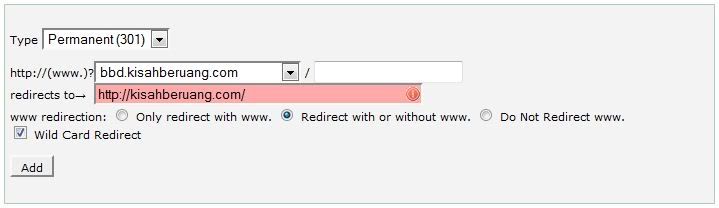
So, after importing all entries and comments, I selected Redirect with or without www and then selected the Wild Card Redirect as well. It was supposed to make your old links go to your new links when people click on them. So it said…
Done. Tested. The main URL has no issue and it got directed to the new domain. But, the old links, such as from search engine results, gave a page not found instead… Hampeh betui…
I saw Sam of serverfreak online and asked him about my problem. He gave me a solution. That’s why I changed from my previous hosting to serverfreak. It has the best customer services so far. Promote dia sebab dah tolong for free… If you need a reliable hosting, give serverfreak a try. Go to http://www.web-hosting.net.my/.
The solution. Changed the .htaccess file in the subdomain. Changed the original,
RewriteCond %{HTTP_HOST} ^bbd.kisahberuang.com$ [OR]RewriteCond %{HTTP_HOST} ^www.bbd.kisahberuang.com$
RewriteRule ^(.*)$ “http\:\/\/kisahberuang\.com$1″ [R=301,L]
To
RewriteEngine onRewriteCond %{HTTP_HOST} ^(www\.)?bbd.kisahberuang\.com [OR]
RewriteCond %{HTTP_HOST} ^kisahberuang\.com
RewriteRule (.*) http://www.kisahberuang.com/$1 [R=301,L]
Now, I managed to get any URL referring to the old domain to go to the new domain. Yes! Aku berjaya…
p/s;
Still could not figure out how to get old links/entries to go to the old links/entries in the new domain. Camna ek?
Subscribe to:
Posts (Atom)